Stop Prompting Like a Tourist: The Metaprompting Method for Better Design


Designing with Google Stitch From Metaprompting to JSON Precision
Picture this: You've got a product idea. A good one. The kind that wakes you up at 3 AM with that dangerous cocktail of excitement and dread. You've thought through the database schema. You know exactly how authentication will work. You've even figured out your event sourcing strategy, because you're the kind of person who plans for scale before you have a single user.
Then you open Figma.
And you stare.
And you keep staring, because what should this screen look like? This is the UI-shaped void of doom—the existential crisis that kills more product ideas than bad market timing. Two hours later, you've scrolled through Dribbble, bookmarked seventeen dashboard designs you'll never reference again, and accomplished absolutely nothing.
I know this because I've lived it. Multiple times. I'm the kind of person who alphabetizes their spice rack—not because I'm organized, but because I have anxiety and need to control SOMETHING in my life. UI decisions feel like chaos wearing a polo shirt.
Here's the uncomfortable truth: UX matters, but pixel-perfect thinking too early is how products die before they're born. You need to move from concept to testable prototype before you've burned all your creative energy debating whether buttons should have rounded corners.
Why AI Breaks the Block
Here's the thing about AI design tools like Google Stitch: they've seen everything. Every dashboard. Every onboarding flow. Every camera interface ever posted to the internet. The AI has absorbed millions of interfaces, which means it knows every design pattern, every trend, every convention that makes users feel at home.
Instead of starting from a blank canvas—which, let's be honest, is just a fancy way of saying "starting from existential dread"—you get a strong, on-trend, theme-consistent baseline immediately. It's like having a really competent designer friend who never sleeps and doesn't judge you for asking dumb questions at 2 AM.
But let me be clear about something: this does not replace designers. Designers bring taste, intuition, emotion, craft—all the things that turn "functional" into "delightful." AI just clears the runway so teams can reach a testable prototype before overinvesting in refinement.
The Sprint Mindset
In the spirit of Jake Knapp's Sprint methodology from Google Ventures, the goal isn't the "best design ever." The goal is a prototype good enough to prove or kill your idea before burning real design calories. Knapp's whole thesis is that you can go from problem to tested solution in five days—and that speed is a feature, not a bug.
This is the mindset shift that AI design tools enable. In a recent project building a teacher documentation app (let's call it "Hummingbird"), I shifted from assistant-first to camera-first to voice-first in the span of a single conversation with an LLM. If I'd been doing this in Figma manually, I'd still be dragging my second rectangle.
What Is Theme Consistency in AI-Generated Design?
Theme consistency means not reinventing your design system every three prompts. It's the difference between a coherent product and a Frankenstein monster stitched together from seventeen different Dribbble shots.
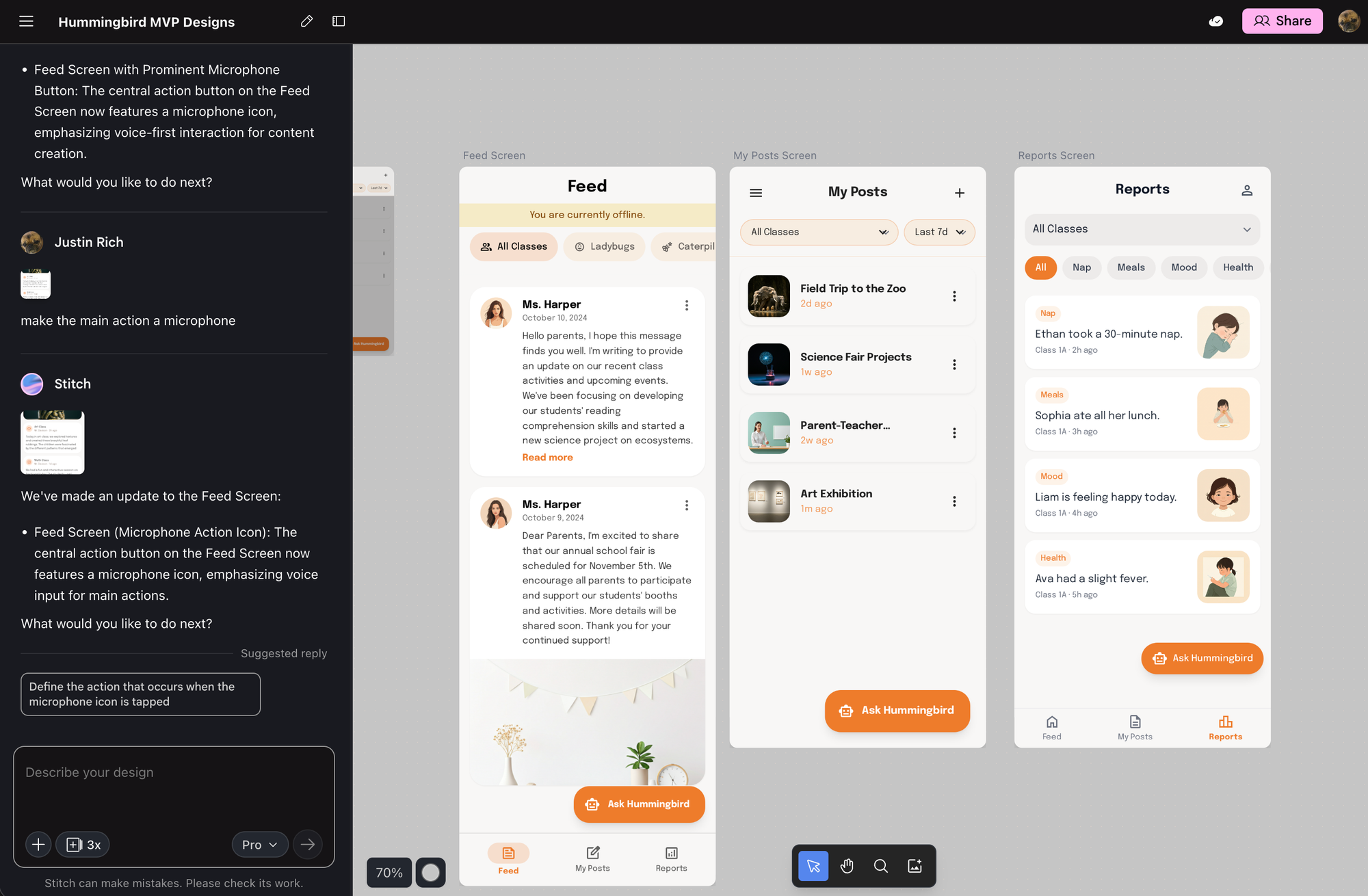
Stitch enforces this through design tokens, layout primitives, components, spacing, and brand color usage. Even when the Hummingbird flows pivoted drastically—from chat-based assistant to camera-centric capture to voice-first interaction—the UI stayed coherent across iterations. Same visual language. Same component library. Different functionality.
This is huge. Because nothing says "amateur hour" like a product where every screen looks like it was designed by a different person having a different day.
Two Core Methods for Designing With Stitch
After working with Stitch across multiple project pivots, I've identified two core methods that actually work. One is fuzzy and exploratory. The other is precise and deterministic. You need both.
Method 1: User-Flow–Focused Ideation Through Metaprompting
What Is Metaprompting?
Here's my definition: Metaprompting is working with one LLM to create the requirements and final prompt wording you will feed into another LLM—because LLMs themselves are insiders who know what works best.
It's basically: "AI, help me ask AI the right way, because you know your own weird social norms."
Why This Actually Works
LLMs understand their own prompt mechanics better than we do. We're like tourists fumbling through phrasebooks; they speak the native dialect. Metaprompting harnesses that insider knowledge to produce clearer, more actionable design instructions.
Think about it: when you write a prompt, you're guessing at what will work. When the LLM helps you write the prompt, it's drawing on patterns from literally billions of successful interactions. It knows which words trigger which behaviors. It knows how to frame constraints. It knows the secret handshakes.
The Restaurant Analogy (Or: Why You Sound Ridiculous)
Imagine trying to order food in a foreign country and absolutely butchering the pronunciation. You, confidently: "I'll have the pollo asado." (pronounced like "polo a-say-dough")
The waiter, annoyed but helpful, turns to the chef and says—in perfect local slang—"He wants the chicken. Make it normal."
That waiter is the LLM. You are the tourist. Metaprompting is when you ask the waiter to teach you exactly what to say so you don't embarrass yourself next time.
The LLM knows the secret handshake to its own brain. Use that.
Metaprompting in Practice: The Hummingbird Project
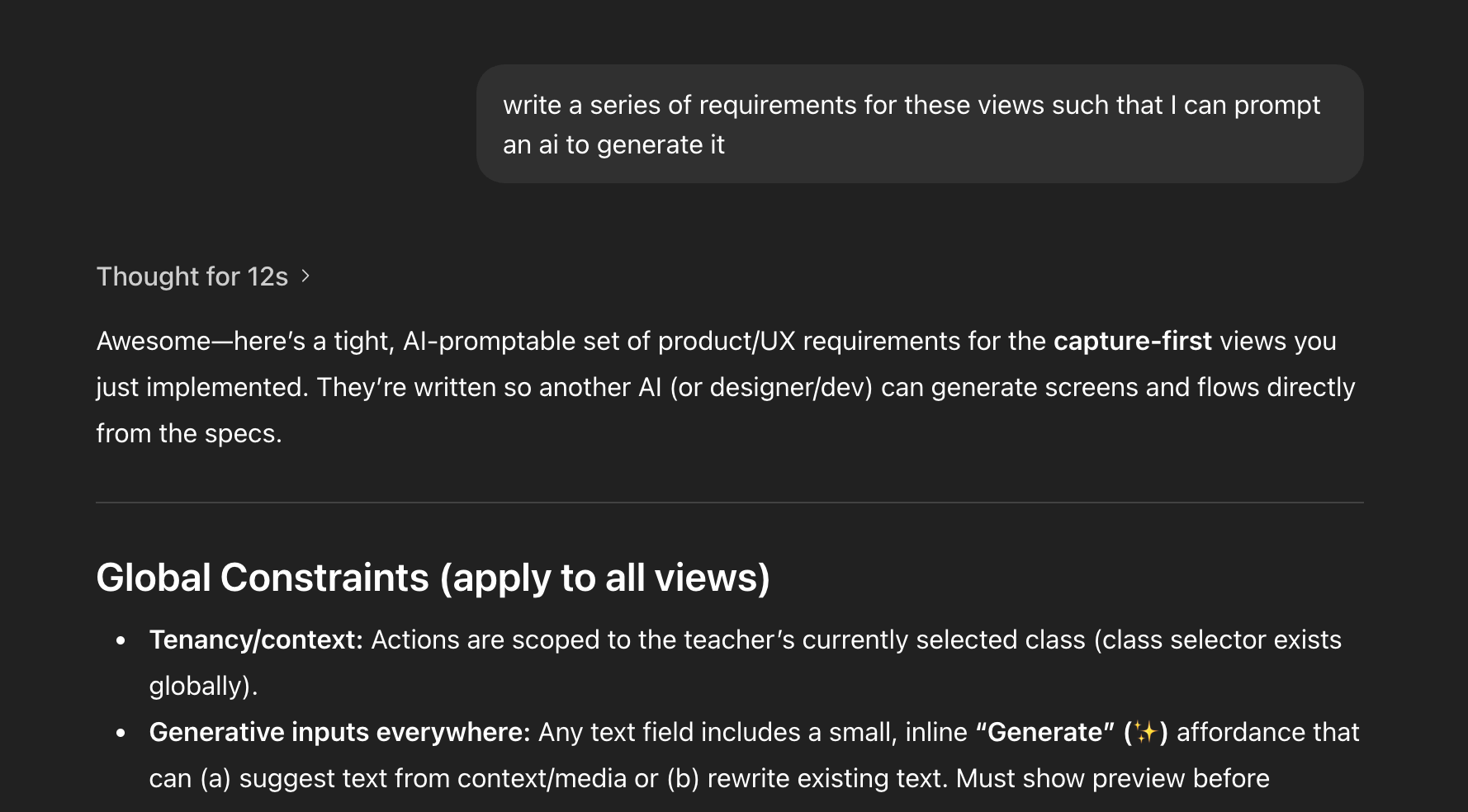
Here's how metaprompting actually played out during the Hummingbird development:
Workflow Definition: I asked, "Given the PRD, what are teacher workflows?" The AI generated detailed, structured, system-ready flows. Not vague suggestions—actual workflows I could implement.
Screen Inventory: "Now what views do we need?" The AI produced feed, reports, posts, assistant overlay, class selector. A complete inventory of screens I hadn't thought to enumerate myself.
Deep IA Challenge: "Should we even have a Classes tab?" This is the kind of structural question that usually takes three meetings and a whiteboard to resolve. The AI restructured my entire navigation model in one response.
Interaction Pivots: "Make taking photos stupid easy" led to capture-first. "Mic, Feed, Care Logs—three buttons" led to voice-first. Each pivot was a complete rethinking of the interaction paradigm, generated in minutes.
Prompt Refinement: "Now write a Stitch JSON for these flows" translated all that fuzzy ideation into deterministic UI definitions.
This is pure metaprompting in action: using one LLM conversation to generate the requirements and prompts for another system.
Method 2: JSON-Based Explicit Generation for Deterministic UI
JSON as Source Code
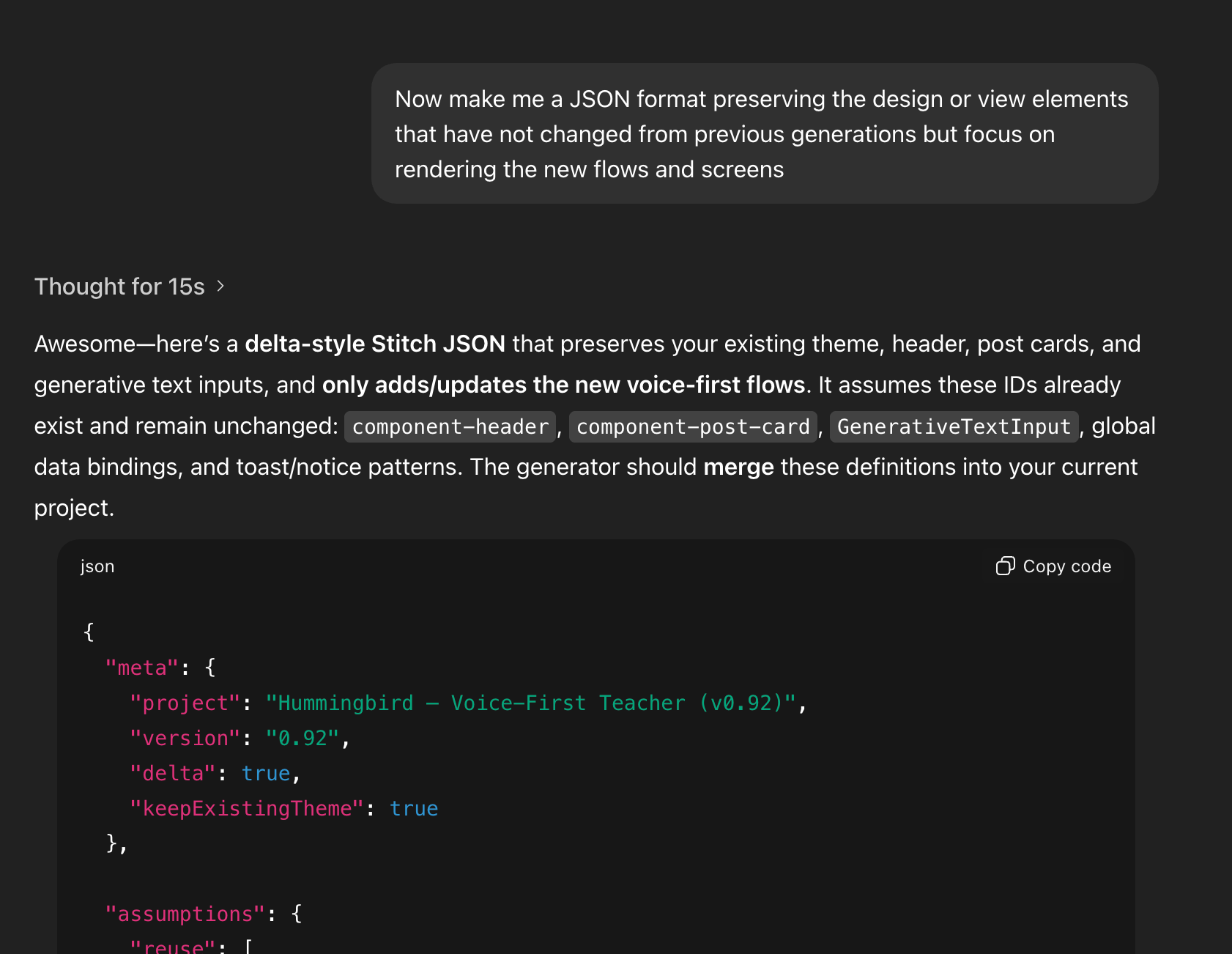
If metaprompting is fuzzy exploration, JSON is precision engineering. JSON is the source code for Stitch-rendered UI. It tells the system exactly what to render: screens, components, data bindings. No ambiguity. No interpretation.
This matters because natural language is inherently squishy. "Make it more modern" could mean a hundred different things. JSON eliminates that ambiguity entirely.
Why JSON Matters
JSON-based generation gives you three superpowers:
Eliminates ambiguity. When you specify a component in JSON, you get exactly that component. Not something the AI thinks is close enough.
Guarantees theme consistency. Reusing the same component definitions means every screen speaks the same visual language automatically.
Enables iterative refinement via delta updates. You can say "change this one thing" and be confident nothing else will drift.
JSON in Practice: Hummingbird Components
In the Hummingbird project, I requested JSON that preserved existing components while adding new flows. The AI generated screen definitions like screen-voice-capture, screen-text-post-draft, screen-photo-post-draft, screen-care-event-draft, and modal-help-commands.
All of them reused component-header, component-post-card, and the established theme tokens. Conceptual flows became renderable, consistent UI instantly.
How Metaprompting and JSON Work Together
These two methods aren't competing approaches—they're complementary phases of the same workflow.
Explore phase: Ask about workflows and user roles. Output: product clarity. Benefit: low-cost ideation.
Metaprompt phase: Define information architecture, articulate pivots, establish constraints. Output: flow coherence. Benefit: AI reasons at system level.
JSON spec phase: Request explicit Stitch JSON definitions. Output: screens and layout. Benefit: deterministic UI.
Delta refine phase: "Preserve what's unchanged; update these specific flows." Output: updated screens. Benefit: zero theme drift.
The magic happens in the handoff between phases. Metaprompting gives you clarity about what to build. JSON gives you precision about how to build it.
Case Study: The Hummingbird Pivots
The Hummingbird project went through three major interaction paradigm shifts, each accomplished entirely through metaprompting with Stitch JSON generating consistent screens on the other end.
Pivot 1: Assistant-First
The initial concept centered on an AI assistant. "Add a magic-wand AI button" that teachers could tap to get contextual help. The assistant would analyze their documentation patterns and suggest improvements.
This felt modern and sophisticated. It was also completely wrong for the actual user workflow.
Pivot 2: Capture-First
After metaprompting through teacher workflows, it became clear that the primary action wasn't asking questions—it was documenting moments. "Let's make photo posting stupid easy—center camera button."
The entire navigation restructured around capture as the primary verb. Assistant features moved to secondary affordances.
Pivot 3: Voice-First
Further workflow analysis revealed that teachers' hands are often occupied during the moments worth documenting. Voice became the killer feature.
"Three actions: Feed, Mic, Care Logs. That's it."
Each pivot generated new Stitch JSON. Each JSON specification reused the established component library and theme tokens. Three fundamentally different interaction paradigms, zero design drift.
Practical Tips for Designers & Engineers Using Stitch
Start with flows, not UI. Before you think about screens, think about what users are trying to accomplish. The screens will emerge from the workflows.
Use metaprompting to clarify intent before specifying screens. Don't jump to "design me a dashboard." First establish what the dashboard needs to show and why.
Lock down reusable components early. Establish your header, card, button, and input components in your first JSON spec. Everything else builds on them.
Use JSON as your contract with the UI generator. Treat it like code. Version it. Review changes. Don't let natural language ambiguity creep back in.
Use delta JSON to evolve your product without rewriting it. "Preserve everything except this flow" is your friend.
Think sprint, not masterpiece. The goal is a testable prototype. You can polish later, after you've validated that you're building the right thing.
AI as an Insider Guide, Not a Replacement
Engineers often freeze on UI decisions. Tools like Google Stitch unfreeze them—not by making design decisions irrelevant, but by providing a strong starting point that eliminates the blank canvas paralysis.
Metaprompting means using the AI as your local fixer—the person who knows how to ask for things correctly in a language you're still learning. JSON means having an implementation language that makes UI deterministic and theme-consistent across any number of pivots.
Designers are still essential. But they start where clarity begins, not where chaos reigns. This combined method lets teams validate ideas fast, then bring human judgment to refine what actually matters.
Because here's the thing: the best design work happens when you know what you're designing. AI gets you there faster. What you do with that clarity—that's still entirely up to you.
• • •
Google Stitch is available at stitch.withgoogle.com. The Sprint book by Jake Knapp is available at thesprintbook.com.